 India
India Australia
 Singapore
 Philippines
5.59 MIN READ
Secure Remote Work: The Complete Guide for SMBs in 2026
 Niten Devalia | Mar 02, 2026
We all know remote and hybrid work are no longer temporary adjustments. They are core business models across the world.
Yet cyber threats are accelerating at a pace many small and medium businesses underestimate.
Recent global cybersecurity research shows:
- Over 2,200 cyberattacks occur every day, one every 39 seconds.
- Phishing accounts for more than 40% of initial breach attempts.
- Nearly 80% of ransomware attacks target businesses with fewer than 500 employees.
- Over 60% of breaches involve human error or credential misuse.
- Most remote employees regularly use personal devices or unsecured home networks.
These figures confirm a simple reality: remote work dramatically expands your attack surface. For Australian SMBs, the consequences extend beyond operational disruption.
A security incident can trigger regulatory obligations under the Privacy Act, reputational damage, financial loss, and long-term customer trust erosion.
Remote work increases productivity and flexibility. It also increases exposure. The solution is not to restrict remote work. The solution is to secure it properly.
This guide explains how Australian SMBs can implement a modern, secure remote work framework using:
- The Essential Eight as a foundation.
- Zero Trust access principles.
- Endpoint detection and response.
- Cloud security controls.
- Microsoft 365 and Azure capabilities.
- Compliance-aligned best practices for Australian regulations.
If your team works remotely, whether fully distributed or hybrid, this guide will provide the clarity and roadmap needed to protect your business in 2026 and beyond.
Why Secure Remote Work Matters for Australian SMBs
Cyber criminals exploit weak passwords, unpatched devices, exposed remote desktop services, and misconfigured cloud platforms. Remote environments increase these attack paths.
Recent trends show:
- Credential theft remains the leading cause of breaches.
- Ransomware groups actively target SMBs.
- Phishing campaigns use AI-generated emails.
- Business email compromise continues to cause financial loss.
The average cost of a data breach in Australia exceeds millions of dollars. For SMBs, one incident can impact cash flow, reputation, and client trust.
The Australian Cyber Security Centre advises all organisations to implement layered security controls. Remote work must follow the same discipline.
The Essential Eight as Your Foundation
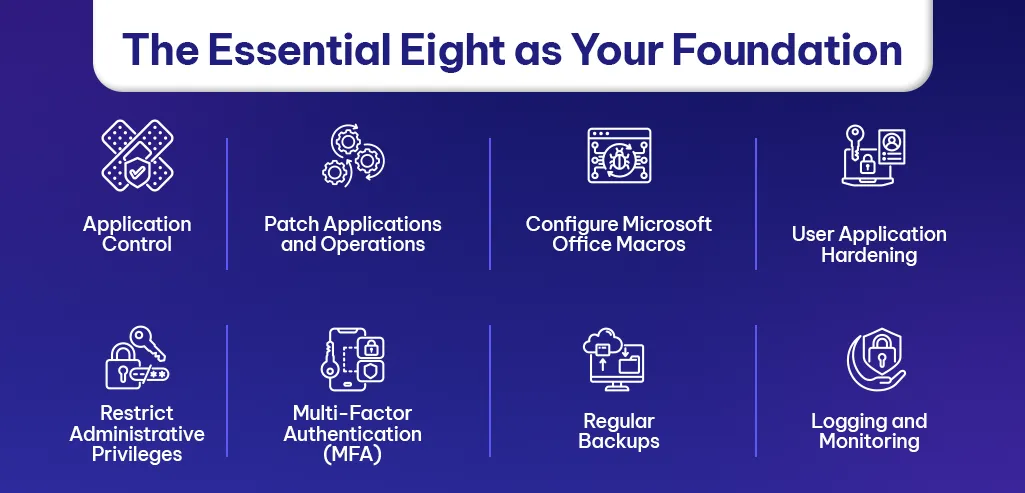
The Essential Eight provides a strong baseline for remote security.
-
Application Control
Restrict which applications employees can run. This prevents malware from executing even if users download malicious files.
-
Patch Applications and Operating Systems
Unpatched systems create easy entry points. Automate updates across all remote devices.
-
Configure Microsoft Office Macros
Block macros from untrusted sources. Many phishing attacks rely on malicious Office documents.
-
User Application Hardening
Disable unnecessary browser plugins. Block Flash and Java. Use supported browsers only.
-
Restrict Administrative Privileges
Employees should not use admin accounts for daily work. Separate standard and admin accounts. Protect admin access with MFA.
-
Multi-Factor Authentication (MFA)
Passwords alone are not enough. Enforce MFA for all cloud apps, email, VPN, and admin accounts.
-
Regular Backups
Follow the 3-2-1 backup rule:
3 copies of data.
2 different storage types.
1 offline or immutable copy.
-
Logging and Monitoring
Enable auditing for login attempts, file access, and permission changes. These controls reduce the likelihood and impact of attacks significantly.
Moving Beyond Perimeter Security: Zero Trust
Remote work eliminates the traditional office perimeter. Zero Trust replaces it.
Zero Trust verifies:
- User identity.
- Device health.
- Location risk.
- Access request context.
Access is granted only to specific applications, not entire networks.
Solutions built on Microsoft platforms such as Entra ID and Azure Virtual Desktop support this model without heavy infrastructure.
Endpoint Security for Remote Devices
Remote endpoints are the largest attack surface.
Device Management
Use mobile device management (MDM) or endpoint management to:
- Enforce encryption.
- Push updates.
- Lock or wipe lost devices.
- Enforce security policies.
Endpoint Detection and Response (EDR)
Traditional antivirus software detects known threats. EDR monitors behaviour.
EDR identifies:
- Suspicious file encryption.
- Credential dumping.
- Unusual network connections.
- Lateral movement.
Cloud Application Security
Remote workers use many SaaS applications. Shadow IT increases risk.
A Cloud Access Security Broker (CASB) helps you:
- Discover unsanctioned apps.
- Apply data loss prevention (DLP) policies.
- Detect abnormal behaviour.
- Protect sensitive information.
Microsoft Defender for Cloud Apps provides integrated CASB capabilities within Microsoft environments.
Secure Remote Access Options
Virtual Desktop Infrastructure (VDI)
VDI keeps data inside controlled cloud environments. Employees access virtual desktops remotely. Data does not remain on personal devices.
Azure Virtual Desktop offers:
- Centralised management.
- Scalable capacity.
- Secure access controls.
- Integration with Entra ID.
Common Remote Work Security Mistakes
Australian SMBs often:
- Disable MFA due to user friction.
- Ignore security alerts.
- Allow unmanaged personal devices.
- Skip backup testing.
- Assume cloud providers handle all security.
How Exigo Tech Helps Australian SMBs
Exigo Tech specialises in secure remote work for Australian businesses. We provide:
- Identity and access configuration.
- Endpoint security deployment.
- Microsoft 365 hardening.
- Zero Trust architecture design.
- Backup and disaster recovery planning.
- 24/7 monitoring and support.
- Compliance alignment for Australian regulations.
We focus on practical security. We align solutions with your budget and business goals.
The Cost of Inaction
Security investment often feels optional until a breach occurs.
Consider the potential impact:
- Operational downtime
- Ransom payments
- Legal fees
- Regulatory fines
- Lost customers
- Brand damage
Security costs far less than recovery.
The Future of Secure Remote Work
Remote and hybrid work will continue across Australia. Attackers will continue to adapt.
AI-driven phishing campaigns increase sophistication. At the same time, AI-powered security improves detection speed.
Layered security remains essential:
- Strong identity protection.
- Device security.
- Network controls.
- Cloud governance.
- Continuous monitoring.
Secure remote work is not a one-time project. It is an ongoing process.
Frequently Asked Questions
1. How much does secure remote work cost?
Many protections are included in Microsoft 365 Business Premium. Advanced services range per user, monthly. The cost is significantly lower than a breach.
2. Can employees use personal devices?
Yes, if managed through MDM with secure containers and enforced policies.
3. What if a device is lost?
Remote wipe and encryption protect company data.
4. Do SMBs need a SOC?
Not internally. Managed security services provide 24/7 monitoring without internal overhead.
5. How fast can we secure our remote workforce?
Core controls can be deployed within weeks. Full architecture may take 2–3 months.

 Exigo Tech - Ask AI (Beta)