Australia
 Singapore
 Philippines
 India
7.38 MIN READ
Making SharePoint AI-Ready: Governance for Metadata, Documents and Content
 Alpesh Prajapati | Nov 13, 2026
SharePoint often becomes the central repository for business documents, policies, contracts, project records and operational knowledge. But as content grows, inconsistent metadata, outdated documents and poorly structured libraries can make information difficult to find and less useful for AI.
Microsoft Copilot in SharePoint introduces capabilities that can help organisations extract metadata, review documents and organise content using natural language. These features create opportunities to improve information management, but they also require clear governance to ensure that content remains accurate, secure and useful.
For organisations already using Microsoft 365, the priority is not simply enabling Copilot. It is preparing SharePoint so that AI can work with well-organised information, appropriate permissions and reliable metadata.
Why SharePoint Governance Matters for Copilot
Copilot’s usefulness depends partly on the quality, accessibility and context of the information it works with. If documents are outdated, metadata is inconsistent or permissions are poorly managed, AI-assisted discovery and document review can become less reliable.
Consider a document library containing hundreds of supplier contracts. Some files may have contract dates and supplier names recorded in metadata, while others rely on filenames or information buried inside the documents. Finding renewal dates or identifying unusual clauses becomes more difficult when the information is inconsistent.
Copilot can help extract and organise this information, but it does not replace the need for sound information architecture, access controls or document ownership.
A governed SharePoint environment should establish clear content structures, standard metadata, appropriate permissions and processes for reviewing information over time.
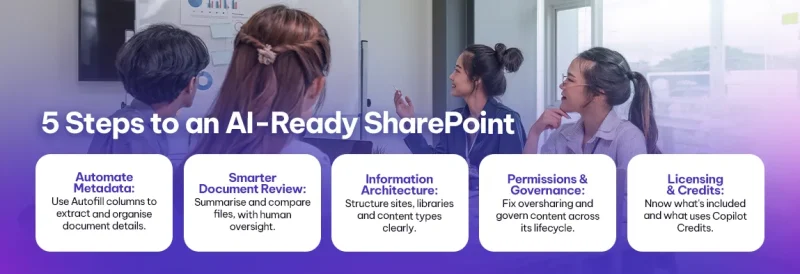
1. Use Copilot to Automate SharePoint Metadata
Metadata helps describe, classify and retrieve documents. Common fields include document type, department, contract expiry date, approval status, supplier and information classification.
Copilot in SharePoint offers an Autofill columns capability that analyses document content and helps create metadata columns. Administrators can describe the information they want to extract, review suggested columns and refine the instructions before applying them.
For example, a contract library could use metadata to identify:
- Supplier or customer name.
- Contract start and expiry dates.
- Contract type and business owner.
- Renewal conditions or non-standard terms.
- Approval status.
Once configured, supported new files can be processed automatically, with extracted information saved into the corresponding library columns. Existing files can also be selected for processing.
2. Improve Document Review Without Removing Human Oversight
Copilot in SharePoint can help users summarise files, compare documents, answer questions about content and generate useful information from selected documents. More advanced capabilities can support work across larger content sets, including document review and synthesis.
These capabilities can help teams identify relevant information without opening every file individually.
For example, a legal or procurement team could use AI-assisted review to identify contracts approaching renewal, compare document versions or locate clauses that require further attention. A compliance team could review policy documents to identify missing information or content that needs updating.
The distinction between assistance and approval is important. Copilot can help surface potential issues, but it should not be treated as the final authority for legal interpretation, compliance decisions or contractual commitments.
3. Strengthen SharePoint Information Architecture
Information architecture defines how content is organised, classified and accessed across SharePoint sites and libraries.
- A well-designed structure helps employees find information, supports consistent governance and gives AI tools clearer context when working with organisational content.
- Start by reviewing existing sites, libraries, folders, metadata columns and content types. Identify duplicate repositories, inconsistent naming conventions and overlapping structures that make information difficult to manage.
Copilot can assist with organising information, but it cannot independently determine the best architecture for every business. The structure should reflect how people work, the sensitivity of the information and the organisation’s retention and compliance requirements.
4. Establish Permissions and Information Governance
Making content easier for AI to discover must not mean making sensitive information more widely accessible.
- Copilot operates within the permissions and access controls of the underlying Microsoft 365 environment. However, existing oversharing or poorly maintained access permissions can still expose information to users who should not have access to it.
- Before expanding Copilot usage, review site membership, library permissions, external sharing and access to confidential documents. Pay particular attention to sensitive information stored in legacy sites or libraries with broad permissions.
Governance should cover the entire content lifecycle, from creation and classification through review, retention and disposal.
5. Understand Copilot Licensing and Credit Consumption
Not every Copilot in SharePoint capability uses the same billing model.
Microsoft’s current documentation distinguishes everyday Copilot in SharePoint capabilities included with an eligible Microsoft 365 Copilot licence from advanced capabilities that use Copilot Credits through usage-based billing.
Advanced work can include large-scale document review, working across extensive content sets and real-time metadata Autofill. Availability and billing requirements depend on the specific capability and configuration.
Before enabling these features broadly, administrators should:
- Confirm which capabilities are included with existing licences.
- Identify advanced features that require usage-based billing.
- Establish spending policies and assign ownership for consumption.
- Test workflows and estimate likely usage before expanding deployment.
How to Build a Governed SharePoint Copilot Strategy
A practical implementation should begin with a focused assessment rather than a tenant-wide rollout.
- First, identify the libraries with the greatest business value or the most significant content management problems. Assess metadata quality, document volumes, permissions and existing governance requirements.
- Next, select a contained use case, such as contract metadata extraction or policy document review. Test Copilot against representative files and validate the results with the employees responsible for that content.
- Document the approved metadata standards, review procedures, permissions and usage controls. Once the pilot demonstrates value, expand to additional libraries using consistent governance practices.
Measure outcomes such as reduced manual tagging, improved document retrieval, faster review cycles and fewer incomplete records. These measures help determine whether the implementation is improving information management rather than simply adding another AI feature.
Why Choose Exigo Tech as Your Managed Intelligence Partner
Exigo Tech helps organisations connect Microsoft 365 capabilities with practical business outcomes through:
- SharePoint Consulting: Improve site structures, document libraries, metadata standards and content management practices.
- Microsoft 365 Copilot Readiness: Assess information quality, access permissions and governance requirements before expanding AI adoption.
- Data Governance and Security: Strengthen information classification, protection and oversight using appropriate technologies and processes.
- Managed Application Support: Maintain SharePoint environments, address evolving business requirements and continuously improve application performance.
As your Managed Intelligence Partner, Exigo Tech helps align AI adoption with information governance, security and operational efficiency.
 Exigo Tech - Ask AI (Beta)