
 Australia
 Singapore
 Philippines
 India
India6.25 MIN READ
Why Cloud Backup Is Essential for Modern Businesses
 Niten Devalia | Aug 17, 2026

Businesses have moved much of their critical information to the cloud. Documents are stored in Microsoft 365, applications run on Azure, and business data is increasingly managed through cloud-based platforms.
That shift has improved accessibility, scalability, and resilience, but it has also created a common misconception: if your data is in the cloud, it is automatically backed up.
It isn’t that simple.
Cloud providers are responsible for securing and maintaining the underlying infrastructure, but organisations still retain responsibility for their own data, identities, configurations, and access controls.
Cloud backup provides an additional layer of protection, helping organisations recover business-critical information after accidental deletion, malicious activity, ransomware, system failures, or other disruptive events.
At Exigo Tech, we help organisations strengthen business continuity and data protection as their Managed Intelligence Partner, combining cloud, backup, security, and recovery strategies around their business requirements.
What Is Cloud Backup?
Cloud backup is the process of securely copying business data to cloud-based storage so it can be recovered when the original information becomes unavailable or compromised.
Depending on the environment, this can include:
- Files and documents
- Microsoft 365 data
- Virtual machines
- Databases
- Business applications
- Servers
- Configuration information
The purpose isn’t simply to store another copy of your data.
Effective backup is about being able to restore the right information at the right time when the business needs it.
Why Cloud Storage Is Not the Same as Backup
One of the most common misconceptions is that storing information in Microsoft 365 or another cloud platform automatically provides a complete backup strategy.
Cloud platforms provide significant resilience and built-in recovery capabilities, but organisations remain responsible for protecting their data under the shared responsibility model.
For example, Microsoft 365 includes capabilities such as retention, versioning, and service-level resiliency. These can help recover from certain scenarios, but they should be considered as part of a broader data protection strategy rather than assuming every recovery requirement is automatically covered.
What Can Cloud Backup Protect Against?
A well-designed backup strategy can help organisations recover from a range of incidents.
-
Accidental Deletion
Employees can accidentally delete important files, emails, or business records.
Backup provides additional recovery options when standard restoration methods are insufficient.
-
Ransomware
Ransomware can encrypt or overwrite large volumes of business information.
A protected backup can provide a recovery point from before the attack, helping organisations restore operations without relying solely on the compromised environment.
-
Malicious Deletion
Not every data loss event is accidental.
A compromised account or malicious insider may intentionally delete or modify important information.
Protected recovery points provide another layer of resilience.
-
System Failures
Hardware failures, application issues, configuration errors, or infrastructure problems can make business data temporarily unavailable.
Backup and recovery capabilities help reduce the impact on operations.
-
Major Disruptions
Natural disasters and other significant events can affect physical infrastructure or business operations.
Cloud-based backup can provide an additional recovery option when local infrastructure is unavailable.

Microsoft 365 Backup: What Businesses Should Know
For organisations heavily invested in Microsoft 365, backup deserves particular attention.
Microsoft 365 Backup can protect:
- SharePoint sites
- OneDrive accounts
- Exchange Online mailboxes
Microsoft 365 Backup also uses an append-only architecture and keeps backup data within the Microsoft 365 data trust boundary, with data residency aligned to the tenant’s existing geography.
This can be particularly relevant for Australian organisations that need to consider data protection, recovery, and residency requirements.
Cloud Backup and Compliance
Backup is not simply a technical consideration.
Organisations may have legal, contractual, and industry-specific obligations around how business and personal information is protected.
They should consider:
- What information needs to be backed up
- How long it should be retained
- Where backup data is stored
- Who can access it
- How recovery is authorised
- How often backups are tested
The right approach depends on the organisation’s data, risk profile, regulatory obligations, and business continuity requirements.
What Makes a Strong Cloud Backup Strategy?
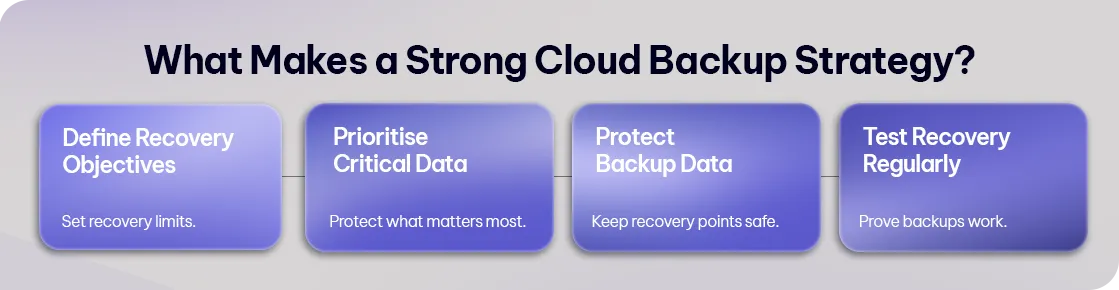
Simply enabling backup isn’t enough.
A resilient strategy should consider several key areas.
-
Define Recovery Objectives
Determine how quickly critical systems need to be restored and how much data the organisation can afford to lose.
These requirements help establish appropriate Recovery Time Objectives (RTOs) and Recovery Point Objectives (RPOs).
-
Prioritise Critical Data
Not every workload has the same business importance.
Identify the applications, systems, and information that are essential to continued operations and prioritise their protection.
-
Protect Backup Data
Backup environments must themselves be secured.
Access controls, least-privilege principles, encryption, and protected recovery points help reduce the risk of attackers compromising backups alongside production systems.
-
Test Recovery Regularly
A backup that has never been restored is an assumption, not a proven recovery strategy.
Regular testing helps verify that:
- Data can actually be recovered
- Recovery processes work as expected
- Recovery times meet business requirements
- Staff know their responsibilities
Cloud Backup vs Disaster Recovery
Backup and disaster recovery are closely related, but they aren’t the same thing.
Backup focuses primarily on preserving recoverable copies of data.
Disaster recovery focuses on restoring technology services and business operations after a significant disruption.
A mature business continuity strategy may require both.
For example, an organisation might use cloud backup to recover deleted or corrupted information while also maintaining disaster recovery capabilities for critical applications and infrastructure.
Common Cloud Backup Mistakes
-
Assuming the Cloud Provider Handles Everything
Cloud providers secure their infrastructure, but customers retain responsibility for their data and configurations.
-
Never Testing Recovery
A successful backup job doesn’t necessarily guarantee a successful recovery.
-
Protecting Data but Not Access
If attackers compromise administrative credentials, they may be able to interfere with backup configurations.
Identity security is therefore an important part of backup protection.
-
Treating Every Workload the Same
Critical applications may require different recovery objectives from less important systems.
Backup strategies should reflect business priorities.
Why Choose Exigo Tech as Your Managed Intelligence Partner
At Exigo Tech, we help Australian organisations design and manage data protection strategies across cloud and hybrid environments.
As your Managed Intelligence Partner, we provide:
- Cloud Backup Solutions
- Microsoft 365 Backup
- Azure Backup
- Backup and Disaster Recovery Assessments
- Business Continuity Planning
- Backup Monitoring and Management
- Recovery Testing
- Cloud Security and Governance
- Ongoing Managed IT Services
Our approach connects backup with cybersecurity, cloud infrastructure, and business continuity rather than treating it as an isolated IT function.


 Exigo Tech - Ask AI (Beta)