 Australia
 Singapore
 Philippines
 India
India6.37 MIN READ
OAuth (Open Authorisation) Consent Phishing in Microsoft 365: How Attackers Are Bypassing MFA Without Stealing Passwords
 Ben Opit | Jun 03, 2026
Passwords and multi-factor authentication have long been seen as the foundation of business security.
But attackers are now finding ways to bypass both, without stealing passwords at all.
One growing threat is OAuth consent phishing. This attack targets the way users grant access to third-party applications in Microsoft 365. Instead of tricking users into entering their password on a fake login page, attackers trick them into approving a malicious application.
Once approved, that application can access emails, files, and other Microsoft 365 data using legitimate tokens.
This makes the attack difficult to detect and dangerous for businesses that rely heavily on Microsoft 365.
At Exigo Tech, we act as your Managed Intelligence Partner, delivering managed IT security services, expert-led IT security consulting, and specialised support from experienced IT security consultants and IT security specialists to help Australian organisations stay ahead of evolving threats like OAuth consent phishing.
What Is OAuth Consent Phishing?
OAuth is an authorisation protocol used by Microsoft 365 and many other platforms.
It allows third-party applications to access user data without requiring the user’s password directly.
For example, a CRM tool, project management platform, or email marketing system may request permission to access email, calendar, or files.
In a legitimate scenario, this improves productivity.
In an OAuth consent phishing attack, cybercriminals abuse the same process.
They create a malicious application that looks trustworthy and trick users into granting it access. Once consent is given, the attacker’s application may be able to:
- Read and search emails
- Access attachments
- Access files in OneDrive and SharePoint
- Monitor internal communications
- Create inbox rules to hide suspicious activity
- Maintain access even after a password change
Because the access is granted through legitimate Microsoft tokens, MFA may not be triggered again after the initial consent.
That is what makes this attack so effective.
Why This Threat Is Growing
OAuth consent phishing is not completely new, but it is becoming more common and more sophisticated.
In May 2026, the FBI issued a public service announcement warning about Kali365, a phishing-as-a-service platform designed to capture OAuth tokens and gain persistent access to Microsoft 365 environments.
Researchers also reported that another platform, EvilTokens, compromised more than 340 Microsoft 365 organisations across five countries within five weeks of going live.
This shows a clear shift in how attackers are targeting identity systems.
How the Attack Works
OAuth consent phishing usually follows a simple but effective process.
The Lure
The attack often starts with a phishing email designed to create urgency.
Common examples include:
- “A document has been shared with you”
- “Your invoice requires approval”
- “IT requires you to verify your account”
- “New voicemail message”
The link may take the user to a legitimate Microsoft authentication or consent page.
This is one reason the attack is so convincing.
The Consent Request
Unlike traditional phishing, the user is not always taken to a fake login page.
Instead, they may see a real Microsoft consent screen.
The malicious application may request permissions such as:
- Read
- ReadWrite
- Read.All
- offline_access
The user may complete their normal MFA process and believe they have safely verified access.
But in reality, they have approved a malicious application.
Silent Access and Persistence
Once consent is granted, the attacker receives OAuth access and refresh tokens.
These tokens can allow API-level access to Microsoft 365 resources without exposing the user’s password.
Password resets may not remove this access.
Only explicit revocation or stronger conditional access controls can close the gap.
Who Is Most at Risk?
OAuth consent phishing can affect any Microsoft 365 environment, but some organisations are more exposed than others.
This includes:
- Small and mid-sized businesses
- Organisations that allow users to consent to third-party apps
- Businesses with frequent supplier and vendor communication
- Teams that rely heavily on shared documents
- Organisations without dedicated security monitoring
- Businesses without strong application governance
Industries commonly targeted include:
- Manufacturing and logistics
- Professional services
- Healthcare and NDIS providers
- Construction and trades
- Trading and distribution
The construction sector is especially exposed because of high-value transactions and complex subcontracting chains, making it attractive for business email compromise activity.
The Business Impact
Once attackers gain access through a consented application, the impact can be significant.
-
Business Email Compromise
Attackers can monitor invoice conversations and insert fraudulent payment details at the right time.
This can lead to direct financial loss.
-
Data Exposure
Sensitive files in OneDrive and SharePoint may be accessed without triggering obvious user-facing alerts.
This may include contracts, pricing data, client records, and internal documents.
-
Internal Phishing
Emails sent from a trusted internal account are more likely to be opened.
This allows attackers to spread the campaign further across the organisation.
-
Regulatory Risk
In Australia, unauthorised access to personal information may trigger obligations under the Notifiable Data Breaches scheme.
This can create legal, operational, and reputational consequences.
How to Reduce Your Risk
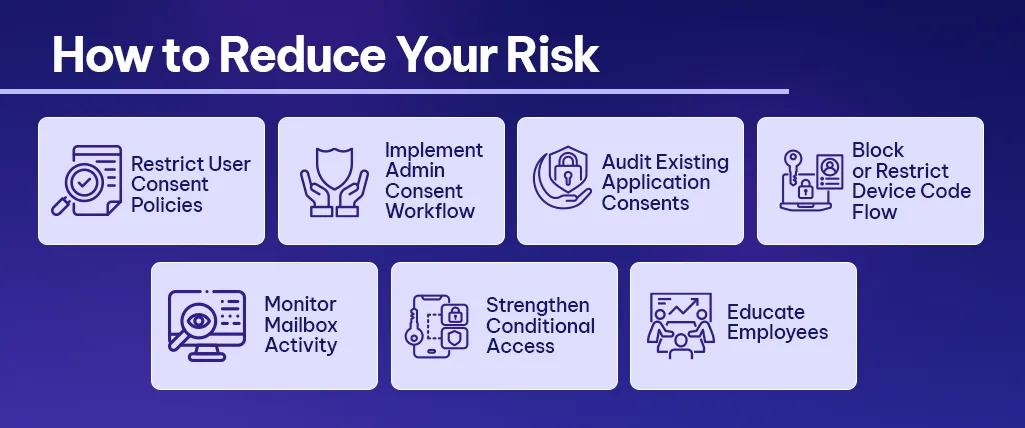
Businesses can take practical steps to reduce exposure to OAuth consent phishing.
-
Restrict User Consent Policies
Configure Microsoft Entra ID so users cannot approve third-party applications without administrator approval.
This is one of the most effective controls because many attacks rely on permissive default settings.
-
Implement Admin Consent Workflow
Users can still request access to applications, but approval should be managed centrally by IT or security teams.
This creates control without completely blocking productivity.
-
Audit Existing Application Consents
Review Enterprise Applications in Microsoft Entra ID.
Look for unknown or suspicious applications, especially those with high-risk permissions such as Mail.ReadWrite, Files.Read.All, or offline_access.
Remove anything that is not recognised or no longer required.
-
Block or Restrict Device Code Flow
The FBI recommends creating conditional access policies to block device code flow for all users, with limited exceptions for required business processes.
Before applying restrictions, organisations should audit current usage to identify legitimate dependencies.
-
Monitor Mailbox Activity
Watch for:
-
- New inbox rules
- External forwarding
- Unusual email activity
- Unexpected access patterns
These can indicate compromised access.
-
Strengthen Conditional Access
Conditional access policies help control how and where applications can access organisational data.
This may include device compliance, location-based controls, and risk-based access rules.
-
Educate Employees
Users should understand that consent prompts can be part of a phishing attack.
Security awareness training should include OAuth consent scenarios, not just fake login pages.
How Exigo Tech Helps
At Exigo Tech, we help Australian businesses secure Microsoft 365 environments against evolving threats like OAuth consent phishing.
As your Managed Intelligence Partner, our approach includes:
- Microsoft 365 Security Health Checks to assess tenant configurations, consent policies, and application permissions
- Managed Security as a Service for continuous monitoring, threat detection, and incident response in partnership with Microsoft and eSentire
- IT security consulting and policy configuration to reduce your attack surface
- Incident response support when suspicious activity is identified
- Ongoing guidance from experienced IT security consultants and IT security specialists
Whether you need to strengthen your current Microsoft 365 security posture or respond to a potential incident, Exigo Tech provides the expertise and partnership to help your organisation stay protected.


 Exigo Tech - Ask AI (Beta)