 Australia
 Singapore
 Philippines
 India
India7.02 MIN READ
QR Code Phishing Is Now the Fastest-Growing Cyber Threat: What Australian Businesses Need to Know
 Niten Devalia | Jun 10, 2026
QR codes have become part of everyday business life.
Employees use them to access documents, complete payments, register for events, verify accounts, and interact with digital services. Because they have become so familiar, most people scan them without hesitation.
Unfortunately, that trust is now being exploited.
QR code phishing, commonly known as quishing, has emerged as one of the fastest-growing cyber threats facing businesses. Attackers are increasingly using malicious QR codes to bypass traditional security controls, steal credentials, and gain access to corporate systems.
For organisations using Microsoft 365 and mobile devices extensively, the risk is growing rapidly.
At Exigo Tech, we help organisations strengthen their security posture as their Managed Intelligence Partner, helping businesses identify emerging threats and implement practical security controls before incidents occur.
Why Quishing Is Becoming a Major Security Concern
While organisations have invested heavily in email security, multi-factor authentication, and phishing awareness training, attackers have found a new path that many traditional controls struggle to detect.
Microsoft’s Threat Intelligence team reported that QR code-based phishing threats increased from 7.6 million in January 2026 to 18.7 million in March 2026 alone.
The FBI has also warned about state-sponsored threat actors using QR codes as part of targeted phishing campaigns.
What Is QR Code Phishing?
Quishing is a phishing technique that hides malicious links inside QR codes.
Instead of sending a traditional hyperlink, attackers encourage users to scan a QR code using their mobile device.
Once scanned, the QR code redirects the user to a fraudulent website designed to:
- Steal credentials
- Capture sensitive information
- Install malware
- Redirect financial transactions
- Compromise Microsoft 365 accounts
Unlike traditional phishing links, users cannot see the destination before scanning the code.
This lack of visibility is one of the reasons quishing is so effective.
Why Traditional Security Tools Often Miss It
Many email security solutions are designed to analyse:
- Text-based links
- Email content
- Attachments
- Known malicious domains
QR codes create a challenge because the malicious URL is embedded within an image.
As a result, attackers can bypass traditional scanning technologies that focus on text-based threats.
The attack often moves from the corporate environment to a personal mobile device, where security controls may be far weaker.
This creates a security blind spot for many organisations.
How Quishing Attacks Typically Work
Although campaigns vary, most follow a similar pattern.
The Initial Email
Attackers send an email that appears legitimate.
Common examples include:
- MFA reset requests
- Payroll notifications
- Shared document alerts
- Account verification requests
- Microsoft 365 system messages
The email contains a QR code rather than a traditional link.
Because QR codes are now common in business communication, users are less likely to view them as suspicious.
The Scan
The user scans the QR code using a smartphone.
The QR code redirects them through one or more URLs before displaying a convincing login page or payment portal.
The page may closely resemble:
- Microsoft 365
- SharePoint
- Banking platforms
- Internal corporate applications
Because the interaction occurs on a mobile device, it can be harder for users to spot warning signs.
The Compromise
Once credentials are entered, attackers can:
- Access Microsoft 365 accounts
- Monitor email communications
- Launch business email compromise attacks
- Steal sensitive information
- Spread phishing attacks internally
In some cases, malware or spyware may also be installed on the device.


Assess Your Microsoft 365 Security Posture
Identify gaps in email security, mobile device protection, and conditional access policies before attackers do.
Book a Free ConsultationWho Is Most at Risk?
While any organisation can be targeted, certain environments face greater exposure.
This includes:
- Businesses heavily reliant on Microsoft 365
- Organisations without mobile device management
- Companies using personal devices for work
- Businesses with limited phishing awareness training
- Industries where QR codes are frequently used operationally
Industries commonly targeted include:
- Healthcare
- Construction
- Logistics
- Retail
- Hospitality
- Manufacturing
Research has also shown that executives are targeted significantly more often than general employees because of their access to sensitive information and financial authority.
The Business Impact of a Successful Attack
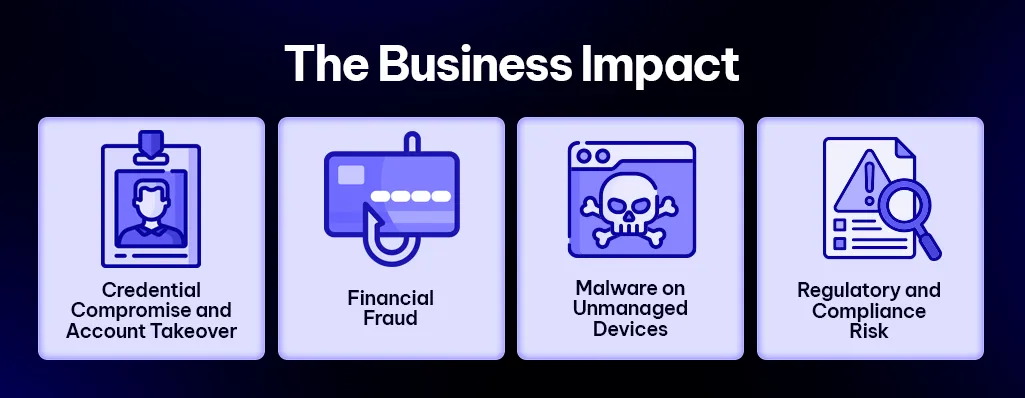
Many organisations assume a phishing attack only affects a single user.
In reality, the consequences can be far broader.
Credential Theft
Compromised Microsoft 365 credentials can provide access to:
- OneDrive
- SharePoint
- Teams
- Business documents
This can give attackers significant visibility across the organisation.
Business Email Compromise
Once attackers gain access to email accounts, they can monitor conversations and insert fraudulent payment instructions into existing invoice or supplier discussions.
This remains one of the most financially damaging cybercrime categories in Australia.
Mobile Security Exposure
Because many attacks occur on personal devices, malicious activity may take place outside the visibility of corporate security teams.
This can make detection and response more difficult.
Compliance and Regulatory Risk
Unauthorised access to personal or sensitive information may trigger regulatory obligations, including potential reporting requirements under Australia’s Notifiable Data Breaches scheme.
The reputational impact can often be as significant as the technical consequences.
How Organisations Can Reduce Their Risk
Defending against quishing requires a combination of technology, policy, and user awareness.
Strengthen Email Security
Organisations should ensure their email security platform can analyse image-based threats, including QR codes embedded in emails and attachments.
Traditional text-only scanning is no longer enough.
Implement Mobile Device Management
Because mobile devices are frequently used in these attacks, organisations need visibility and control over devices accessing corporate resources.
Mobile device management can help enforce security policies and improve protection.
Strengthen Conditional Access Controls
Conditional access policies can help reduce risk by controlling how users access Microsoft 365 resources.
This may include:
- Device compliance requirements
- Risk-based authentication
- Location-based restrictions
These controls can help limit the impact of compromised credentials.
Update Security Awareness Training
Many phishing awareness programmes focus only on suspicious links and attachments.
Employees should also be trained to recognise QR code-based threats.
Users should be encouraged to:
- Avoid scanning QR codes from unsolicited emails
- Verify QR codes before use
- Exercise caution with public QR codes
Awareness remains one of the most effective defences.
Monitor for Suspicious Activity
Organisations should monitor for indicators such as:
- Unusual sign-in activity
- Impossible travel events
- New device registrations
- Unexpected account behaviour
Early detection can significantly reduce the impact of a successful attack.
Why Choose Exigo Tech as Your Managed Intelligence Partner
At Exigo Tech, we help organisations stay ahead of emerging cyber threats through a combination of technology, expertise, and ongoing support.
As your Managed Intelligence Partner, we provide:
- Microsoft 365 Security Health Checks
- Managed Security as a Service (MSaaS)
- IT security consulting
- Mobile and endpoint security solutions
- Threat monitoring and incident response support
- Guidance from experienced IT security consultants and specialists
Our goal is to help organisations strengthen security without adding unnecessary complexity.
QR Code Security Must Become Part of Your Cybersecurity Strategy
QR codes have become a normal part of business operations.
That is exactly why attackers are using them.
As quishing continues to grow, organisations need to extend security beyond traditional email protection and recognise that mobile devices are now a critical part of the attack surface.
The organisations that adapt early will be better positioned to reduce risk, protect credentials, and strengthen their overall security posture.

Strengthen Your Defences Against Modern Phishing Threats
Learn how our Managed Security as a Service (MSaaS) can help protect your organisation from evolving cyber threats.
Explore MSaaS Here


 Exigo Tech - Ask AI (Beta)