
 Singapore
 Australia
 Philippines
 India
India5.58 MIN READ
Zero Trust Implementation Guide: A Practical Roadmap for Modern Businesses
 Niten Devalia | Jul 13, 2026
Cybersecurity has evolved beyond protecting a network perimeter.
With hybrid work, cloud applications, AI, mobile devices, and third-party integrations becoming standard, organisations can no longer assume that users or devices inside the network are automatically trustworthy.
This shift has made Zero Trust one of the most important cybersecurity strategies for modern businesses.
Despite its growing adoption, many organisations still view Zero Trust as a complex framework rather than a practical implementation strategy.
The reality is that Zero Trust is not a product you buy; it is an approach to designing and operating a secure IT environment.
At Exigo Tech, we help organisations implement Zero Trust as their Managed Intelligence Partner, building practical security roadmaps that reduce risk while supporting business growth and digital transformation.
What Is Zero Trust?
Zero Trust is based on a simple principle:
Never trust. Always verify.
Rather than automatically trusting users, devices, or applications because they are inside the corporate network, Zero Trust continuously validates every access request.
This approach considers factors such as:
- User identity
- Device health
- Location
- Risk level
- Application access
- Behaviour
Access is only granted when the appropriate security requirements are met.
Why Businesses Are Moving to Zero Trust
Traditional security models assumed that users working inside the corporate network were trustworthy.
Today’s business environment looks very different.
Organisations now operate with:
- Hybrid workforces
- Cloud-first applications
- Microsoft 365 environments
- SaaS platforms
- Mobile devices
- AI-powered business tools
- Third-party integrations
These changes have significantly expanded the attack surface.
Identity-based attacks, ransomware, phishing, token theft, and compromised accounts have become far more common than traditional network intrusions.
Zero Trust addresses these modern challenges by focusing on identity, access, and continuous verification.

Steps to Implement a Zero Trust Approach
Step 1: Understand Your Current Security Posture
Every successful Zero Trust journey begins with visibility.
Before implementing new controls, organisations should assess:
- Users and identities
- Devices
- Applications
- Cloud services
- Administrative accounts
- Data locations
- Existing security controls
A security assessment provides a clear understanding of current risks and helps prioritise improvements.
Step 2: Strengthen Identity Security
Identity has become the new security perimeter.
Protecting user identities should be one of the highest priorities in any Zero Trust strategy.
Key controls include:
- Multi-Factor Authentication (MFA)
- Microsoft Entra ID
- Single Sign-On (SSO)
- Conditional Access
- Passwordless authentication
- Privileged Identity Management (PIM)
Strong identity controls significantly reduce the likelihood of account compromise.
Step 3: Implement Least-Privilege Access
Users should only have access to the systems and information necessary for their roles.
Over time, many organisations accumulate excessive permissions that increase security risk.
Regular access reviews help ensure:
- Unnecessary permissions are removed
- Administrative access is tightly controlled
- Temporary privileges are managed appropriately
- Role-based access remains accurate
Least-privilege principles reduce the impact of compromised accounts.
Step 4: Secure Endpoints
Every laptop, desktop, mobile phone, and tablet accessing business resources should meet defined security standards.
This includes:
- Endpoint Detection and Response (EDR)
- Device compliance policies
- Encryption
- Patch management
- Antivirus and anti-malware protection
Device health should become part of every access decision.
Step 5: Protect Applications and Cloud Services
Modern businesses rely heavily on cloud applications.
Zero Trust requires organisations to secure:
- Microsoft 365
- Azure
- SaaS applications
- Business-critical systems
- APIs and integrations
Conditional Access policies help ensure only authorised users on compliant devices can access these services.
Step 6: Protect Your Data
Data protection sits at the centre of Zero Trust.
Regardless of where information is stored, organisations should know:
- What sensitive data exists
- Where it resides
- Who can access it
- How it is shared
Microsoft Purview helps organisations classify, protect, and govern information across Microsoft 365.
Combining data governance with Zero Trust ensures sensitive information remains protected even when accessed through AI, cloud services, or remote devices.
Step 7: Monitor Continuously
Zero Trust is not a “set and forget” approach.
Continuous monitoring enables organisations to identify:
- Suspicious login activity
- Unusual user behaviour
- Privilege escalation
- Malware activity
- Data exfiltration attempts
Security Operations Centres (SOC), Managed Detection and Response (MDR), and AI-powered monitoring help detect threats before they become major incidents.
Step 8: Prepare for Incident Response
Even the strongest security controls cannot eliminate every threat.
A mature Zero Trust strategy includes:
- Incident response plans
- Backup and recovery processes
- Disaster recovery testing
- Business continuity planning
Preparation enables organisations to recover quickly while minimising operational disruption.
Common Mistakes During Zero Trust Adoption
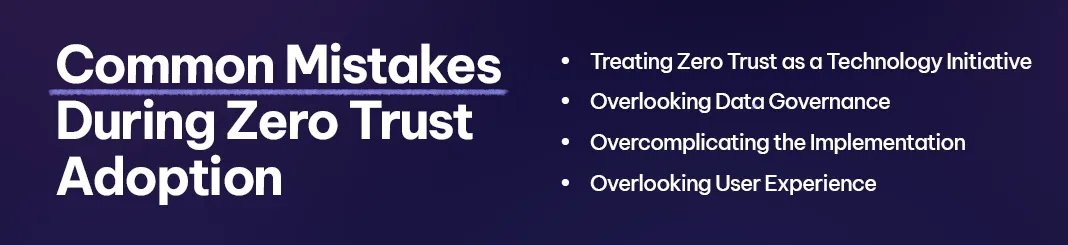
Many organisations attempt to implement Zero Trust by purchasing new security products without first developing a strategy.
Common challenges include:
-
Treating Zero Trust as a Technology Project
Zero Trust requires changes to governance, processes, and security culture, not just technology.
-
Ignoring Data Governance
Poorly managed permissions and unclassified information limit the effectiveness of Zero Trust.
-
Trying to Do Everything at Once
Successful organisations adopt Zero Trust progressively, prioritising high-risk areas first.
-
Neglecting User Experience
Security should support productivity rather than create unnecessary complexity.
Balancing protection with usability improves long-term adoption.
The Role of Microsoft in Zero Trust
Microsoft provides a comprehensive security ecosystem that supports Zero Trust implementation.
Solutions commonly include:
- Microsoft Entra ID
- Microsoft Defender
- Microsoft Purview
- Microsoft Intune
- Microsoft Sentinel
- Microsoft 365
Together, these platforms provide integrated identity, endpoint, compliance, and monitoring capabilities that align with Zero Trust principles.
Why Choose Exigo Tech as Your Managed Intelligence Partner
At Exigo Tech, we help organisations implement Zero Trust through practical, business-focused security strategies.
As your Managed Intelligence Partner, we provide:
- Zero Trust cybersecurity assessments
- Microsoft Entra ID implementation
- Microsoft Defender deployment
- Microsoft Purview governance
- Identity and access management
- Managed Security as a Service (MSaaS)
- Security Operations Centre (SOC)
- Ongoing cybersecurity consulting and optimisation
Our focus is on helping organisations strengthen security while supporting business agility, cloud adoption, and digital transformation.
Zero Trust Is a Journey, Not a Destination
Cyber threats will continue to evolve, and traditional perimeter-based security is no longer sufficient.
Zero Trust provides a practical framework for protecting identities, devices, applications, and data in today’s cloud-first business environment.
Rather than attempting a complete transformation overnight, organisations should take a phased approach, starting with identity, strengthening governance, improving visibility, and continuously enhancing security over time.
Businesses that invest in Zero Trust today will be better prepared to manage tomorrow’s cybersecurity challenges while enabling secure growth and innovation.



 Exigo Tech - Ask AI (Beta)