
 India
India Australia
 Singapore
 Philippines
6.47 MIN READ
Cloud Cost Optimisation: How Businesses Can Reduce Azure Spending Without Slowing Growth
 Niten Devalia | Sep 30, 2026
Usually, rising cloud costs are not caused by one major expense. They come from unused resources, oversized workloads, inefficient licensing, inconsistent environments, and limited visibility into how cloud services are being consumed.
This makes cloud cost optimisation an ongoing business discipline rather than a one-time cost-cutting exercise.
For organisations using Microsoft Azure, the goal should not simply be to spend less. It should be to ensure every dollar invested in the cloud contributes to business outcomes.
At Exigo Tech, we help organisations optimise their cloud environments as their Managed Intelligence Partner, balancing cost, performance, security, and scalability across their technology environment.
What Is Cloud Cost Optimisation?
Cloud cost optimisation is the process of managing cloud resources to achieve the required business and technical outcomes at the most appropriate cost.
It involves understanding:
- What cloud resources are being used
- How much they cost
- Who is using them
- Whether they are appropriately sized
- Which resources are underutilised
- Where spending can be reduced
- How future cloud requirements will affect costs
Effective optimisation combines technology, financial management, governance, and ongoing monitoring.
Why Cloud Costs Keep Increasing
Cloud platforms make it easy to deploy new services.
That flexibility can become a problem when organisations create resources without establishing clear cost controls.
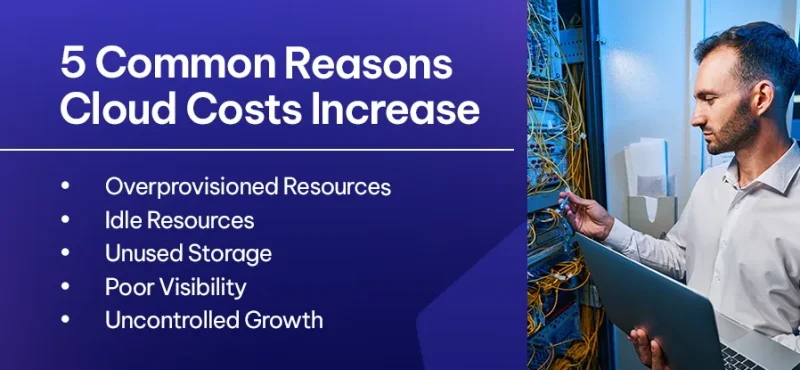
Common causes of cloud cost increases include:
-
Overprovisioned Resources
Virtual machines, databases, and other workloads may be larger than necessary for actual usage.
-
Idle Resources
Development, testing, or temporary environments can continue running long after they are needed.
-
Unused Storage
Old backups, snapshots, logs, and data can accumulate over time and generate unnecessary costs.
-
Poor Visibility
When teams cannot clearly see where cloud spending is going, identifying optimisation opportunities becomes difficult.
-
Uncontrolled Growth
New workloads can be deployed faster than finance and IT teams can review their associated costs.
Step 1: Establish Cloud Cost Visibility
You cannot optimise what you cannot measure.
Start by establishing visibility across your Azure environment.
Review:
- Monthly cloud expenditure
- Spending by subscription
- Resource-level costs
- Department or project costs
- Usage trends
- Unexpected cost increases
Microsoft Azure provides tools such as Azure Cost Management to help organisations understand and monitor cloud expenditure.
Clear visibility creates the foundation for better financial and operational decisions.
Step 2: Identify Unused and Underutilised Resources
One of the simplest optimisation opportunities is identifying resources that are no longer required.
Look for:
- Unused virtual machines
- Orphaned disks
- Unattached public IP addresses
- Unused databases
- Old snapshots
- Idle development environments
Removing unnecessary resources can deliver immediate savings without affecting production workloads.
Step 3: Right-Size Your Azure Environment
Cloud resources should match actual workload requirements.
If a virtual machine consistently operates at a fraction of its available capacity, it may be possible to move to a smaller instance.
Similarly, workloads experiencing consistently high utilisation may require additional capacity.
Right-sizing should consider both current usage and future requirements rather than simply choosing the cheapest available option.

Step 4: Optimise Storage
Storage costs can quietly grow as businesses accumulate data.
Organisations should regularly review:
- Data retention requirements
- Storage tiers
- Backup policies
- Snapshots
- Archived information
- Redundant data
Azure storage options allow businesses to align storage costs with how frequently information needs to be accessed.
Frequently accessed data may require higher-performance storage, while older information can potentially be moved to lower-cost tiers.
Step 5: Optimise Development and Test Environments
Development environments can become a significant source of unnecessary cloud spending.
These workloads may only be required during business hours, yet resources can remain active around the clock.
Organisations can reduce costs by implementing:
- Automated start and stop schedules
- Environment shutdown policies
- Resource tagging
- Temporary environment controls
These relatively simple measures can prevent businesses from paying for resources when nobody is using them.
Step 6: Review Azure Reservations and Savings Options
For predictable workloads, organisations can evaluate Azure purchasing options designed to reduce long-term costs.
Depending on workload requirements, this may include:
- Azure Reservations
- Azure Savings Plan for Compute
- Appropriate licensing benefits
However, these options should be evaluated carefully.
Committing to capacity without understanding future requirements can create a different type of cost inefficiency.
Cloud optimisation should therefore consider both technical usage and commercial strategy.
Step 7: Introduce Cloud Governance
Cost optimisation becomes difficult when every team manages cloud resources differently.
Establish governance around:
- Resource naming
- Tagging
- Budgets
- Ownership
- Approval processes
- Resource lifecycles
For example, tagging resources by department, project, application, or environment can make it easier to understand who is responsible for cloud spending.
Step 8: Implement FinOps Practices
Cloud cost optimisation becomes more effective when finance, IT, and business teams work together.
This approach is commonly associated with FinOps, a discipline that brings financial accountability into cloud operations.
A practical FinOps approach can help organisations:
- Forecast cloud spending
- Allocate costs
- Monitor budgets
- Identify optimisation opportunities
- Connect cloud usage to business outcomes
This shifts cloud cost management from reactive bill reduction to continuous financial and operational management.
Cloud Cost Optimisation Is Not About Cutting Everything
Reducing cloud spending should never come at the expense of security, performance, or business continuity.
- For example, reducing backup retention without understanding recovery requirements may lower costs while increasing business risk.
- Similarly, downsizing critical workloads without considering performance requirements can affect employees and customers.
The objective is optimised cloud spending, not simply lower cloud spending.
Why Choose Exigo Tech as Your Managed Intelligence Partner
At Exigo Tech, we help organisations gain greater control over their Azure investments through a combination of cloud expertise, financial optimisation, governance, and ongoing management.
As your Managed Intelligence Partner, we provide:
- Azure Cost Optimisation Assessments
- Cloud FinOps Consulting
- Azure infrastructure optimisation
- Resource right-sizing
- Cloud governance
- Cost monitoring and reporting
- Azure migration and modernisation advisory
- Ongoing managed cloud services


 Exigo Tech - Ask AI (Beta)