
 India
India Australia
 Singapore
 Philippines
5.32 MIN READ
Microsoft Copilot Readiness Framework for Australian Businesses: A Step-by-Step Guide
 Alpesh Prajapati | Jul 29, 2026
Artificial Intelligence is quickly becoming a standard part of the modern workplace.
Across Australia, organisations are adopting Microsoft Copilot to improve productivity, automate repetitive tasks, streamline collaboration, and support better decision-making. From drafting documents and summarising meetings to analysing data and generating reports, Copilot is changing how employees interact with Microsoft 365.
However, successfully deploying Microsoft Copilot involves much more than purchasing licences.
Without the right foundations, organisations may expose sensitive information, create governance challenges, or fail to realise the full value of their AI investment.
A structured Copilot Readiness Framework helps businesses prepare their Microsoft 365 environment, data, users, and governance before AI becomes part of everyday operations.
At Exigo Tech, we help organisations adopt Microsoft Copilot securely as their Managed Intelligence Partner, ensuring AI delivers measurable business outcomes while maintaining security, compliance, and operational control.
Why Copilot Readiness Matters
Microsoft Copilot works by accessing information users already have permission to view across Microsoft 365.
This includes:
- Outlook emails
- Teams conversations
- SharePoint documents
- OneDrive files
- Word documents
- Excel workbooks
- PowerPoint presentations
If permissions are poorly managed or sensitive data lacks appropriate governance, Copilot may surface information that organisations never intended to make easily discoverable.
Preparing your environment before deployment helps maximise productivity while reducing risk.
Step 1: Assess Your Microsoft 365 Environment
Every successful Copilot deployment begins with understanding your current environment.
Organisations should review:
- Microsoft 365 licensing
- Tenant configuration
- User identities
- Device management
- Collaboration platforms
- Existing security controls
This assessment establishes a baseline for identifying gaps that could affect Copilot adoption.
Step 2: Review Identity and Access Management
Identity is the foundation of Microsoft Copilot security.
Before enabling AI capabilities, organisations should strengthen identity management using Microsoft Entra ID.
Key areas include:
- Multi-Factor Authentication (MFA)
- Conditional Access
- Single Sign-On (SSO)
- Role-Based Access Control (RBAC)
- Privileged Identity Management (PIM)
Strong identity governance ensures Copilot only accesses information users are authorised to view.

Step 3: Improve Data Governance
AI is only as valuable as the data it can access.
Many organisations have accumulated years of documents, emails, and collaboration content without consistent governance.
Before deploying Copilot, review:
- SharePoint permissions
- OneDrive sharing
- Teams access
- Sensitive information
- Duplicate or obsolete content
Improving governance helps ensure Copilot generates accurate and appropriate responses.
Step 4: Implement Microsoft Purview
Microsoft Purview plays a central role in Copilot readiness.
It helps organisations:
- Classify sensitive information
- Apply sensitivity labels
- Implement Data Loss Prevention (DLP)
- Manage data retention
- Improve compliance
- Strengthen information protection
These controls help protect business data as AI usage expands across Microsoft 365.
Step 5: Strengthen Security Controls
Copilot readiness should include a review of Microsoft security capabilities.
Important areas include:
- Microsoft Defender
- Email protection
- Endpoint security
- Conditional Access
- Threat monitoring
- Identity protection
A secure Microsoft 365 environment creates a safer foundation for AI adoption.
Step 6: Identify High-Value Use Cases
Successful Copilot deployments focus on business outcomes rather than technology alone.
Organisations should identify areas where AI can deliver immediate value.
Examples include:
- Document creation
- Meeting summaries
- Email drafting
- Financial reporting
- Sales proposal development
- Knowledge discovery
- Project updates
Starting with targeted use cases helps demonstrate value while supporting gradual adoption.
Step 7: Develop AI Governance Policies
Technology alone cannot manage AI responsibly.
Every organisation should establish policies covering:
- Approved AI usage
- Data handling expectations
- Privacy requirements
- Responsible AI practices
- User responsibilities
- Governance ownership
Clear policies create consistency across departments while reducing operational risk.
Step 8: Prepare Employees
Copilot changes how employees work.
Providing training before deployment improves adoption and helps employees understand:
- How Copilot works
- Appropriate use cases
- Data security responsibilities
- AI limitations
- Prompting best practices
Well-informed users are more likely to achieve better business outcomes.
Step 9: Start with a Pilot Programme
Rather than deploying Copilot organisation-wide immediately, begin with a controlled pilot.
A pilot group allows organisations to:
- Validate governance
- Gather user feedback
- Identify improvement opportunities
- Measure productivity gains
- Refine training materials
Lessons learned can then guide broader deployment.
Step 10: Continuously Optimise
Copilot readiness does not end after implementation.
As AI capabilities evolve, organisations should regularly review:
- Security controls
- User adoption
- Governance effectiveness
- Data permissions
- Business outcomes
- Emerging AI features
Continuous improvement ensures Copilot continues delivering value while maintaining strong governance.
Common Copilot Readiness Challenges
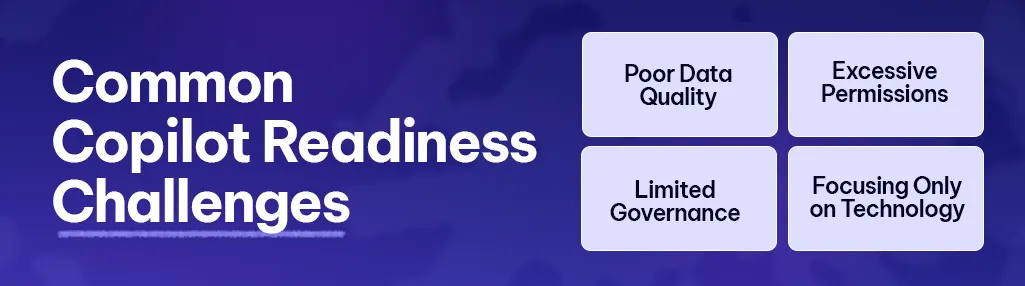
Many organisations underestimate the importance of preparation.
Common issues include:
-
Poor Data Quality
Outdated or duplicate information reduces the usefulness of AI-generated responses.
-
Excessive Permissions
Over-permissioned users may gain unintended access to information through Copilot.
-
Limited Governance
Without clear AI policies, employees may use Copilot inconsistently or inappropriately.
-
Focusing Only on Technology
Successful adoption requires people, processes, governance, and change management—not just software deployment.
Addressing these challenges early improves both user experience and long-term success.
Why Choose Exigo Tech as Your Managed Intelligence Partner
At Exigo Tech, we help Australian organisations prepare for Microsoft Copilot through structured assessments, governance, and secure implementation.
As your Managed Intelligence Partner, we provide:
- Microsoft Copilot Readiness Assessments
- Microsoft 365 Security Health Checks
- Microsoft Purview implementation
- Microsoft Entra ID optimisation
- AI governance consulting
- Microsoft 365 optimisation
- Power Platform and Copilot Studio advisory
- Ongoing AI and managed IT services
Our approach ensures organisations adopt Microsoft Copilot with confidence while balancing productivity, security, and compliance.
Preparation Determines AI Success
Microsoft Copilot has the potential to transform how organisations work, collaborate, and make decisions.
However, successful adoption depends on much more than enabling AI features.
By strengthening identity management, improving data governance, implementing Microsoft Purview, establishing clear AI policies, and preparing employees, organisations create the foundation needed for secure and effective AI adoption.
Businesses that invest in readiness today will be better positioned to maximise the value of Microsoft Copilot while protecting their information, supporting compliance, and accelerating digital transformation.



 Exigo Tech - Ask AI (Beta)