Philippines
 Australia
 Singapore
 India
8.01 MIN READ
Azure AI Cost Management: A Practical FinOps Guide for Models, Data and Agents
 Niten Devalia | Nov 23, 2026
AI projects can deliver measurable business value, but their operating costs are more complex than a standard cloud workload. With Azure AI, spending can come from model inference, token consumption, data ingestion, storage, search services, agent execution and the supporting infrastructure that keeps everything running.
For organisations moving AI solutions from pilot to production, these costs can spread across teams, subscriptions and environments. A chatbot may appear inexpensive during testing but become more costly as usage increases, conversations grow longer or agents repeatedly call external tools.
Azure FinOps provides a framework for managing these expenses through visibility, accountability and continuous optimisation. Rather than focusing only on reducing cloud bills, businesses need to understand what each AI use case costs, who owns that spending and whether the resulting business value justifies the investment.
Why AI Requires a Different Approach to FinOps
Traditional Azure cost optimisation often focuses on compute capacity, storage consumption, networking and resource utilisation. AI introduces additional variables because costs can change with the model selected, the number of tokens processed, the frequency of requests and the complexity of an agent’s workflow.
A single user interaction may trigger multiple model calls, retrieve documents from a search index, execute code and invoke external services. Each component can contribute to the total cost.
Effective AI FinOps therefore requires a broader view of the entire solution rather than monitoring model charges in isolation.
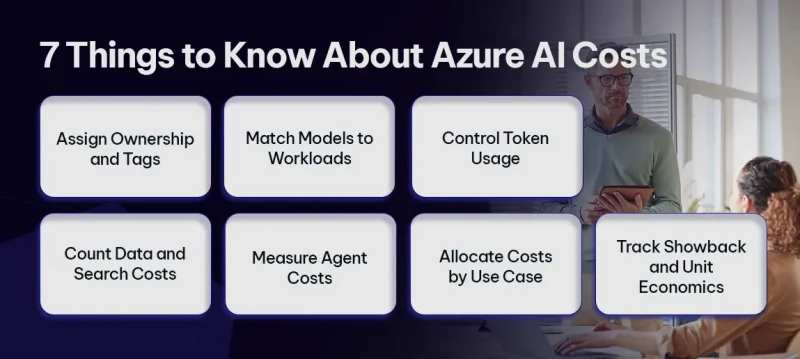
1. Establish Cost Ownership and Resource Tagging
AI costs are difficult to control when nobody is accountable for them.
Start by assigning an owner to every production AI use case. Record the business sponsor, technical owner, budget, intended outcome and expected consumption.
Use consistent Azure tags and resource naming conventions to identify:
- Business unit or department.
- Application or AI use case.
- Environment, such as development, testing or production.
- Cost centre and budget owner.
- Project or product identifier.
2. Choose Models and Deployments Based on the Workload
The most capable model is not automatically the most cost-effective choice for every task.
A complex reasoning model may be appropriate for multi-step analysis, while a smaller model may be sufficient for classification, extraction, summarisation or routine customer queries.
Evaluate models against representative workloads, considering response quality, latency, throughput, token consumption and price. Test whether a simpler model can meet the required accuracy before committing to a more expensive option.
Match the deployment model to expected demand, performance requirements and workload predictability. Review underused deployments and remove or scale down resources that are no longer required.
3. Control Token and Inference Consumption
Token usage is one of the main cost drivers for language-model workloads. Both input and output consumption can affect charges, with rates varying by model, deployment and billing arrangement.
Input consumption includes the prompt, instructions, conversation history and contextual information supplied to the model. Output consumption includes the generated response. Repeatedly sending large amounts of context can increase costs even when the final answer is short.
Practical controls include:
- Keeping system instructions focused and avoiding unnecessary repetition.
- Retrieving only relevant documents instead of passing entire repositories into a prompt.
- Limiting response length where the task does not require detailed output.
- Managing conversation history so old context is not included unnecessarily.
- Using caching or other supported efficiency techniques where appropriate.
- Tracking input and output tokens by use case, model and environment.

4. Include Data Ingestion, Search and Storage Costs
AI applications often rely on more than a model endpoint. Retrieval-augmented generation, document analysis and enterprise search may require data ingestion pipelines, embedding generation, vector indexes and storage.
For example, a business knowledge assistant may need to extract content from documents, create embeddings, store searchable representations and retrieve relevant passages for each query. These supporting services introduce costs that are separate from model inference.
Build a cost inventory covering the full data lifecycle:
- Initial data extraction and ingestion.
- Transformation, chunking and embedding generation.
- Search indexes and vector storage.
- Data refreshes and reprocessing.
- Storage of source documents and application data.
- Monitoring, logging and supporting infrastructure.
5. Measure the Full Cost of AI Agents
AI agents introduce additional cost drivers because they can perform multiple actions in response to a single request.
An agent might call a language model, search documents, execute code, retrieve records from an application and call the model again to formulate a response. More complex workflows may also involve retries, delegation or multiple agents.
6. Allocate Costs by Environment and Business Use Case
Development, testing and production environments should not be treated as one undifferentiated AI budget.
Development environments may generate costs through experimentation, evaluation and repeated model calls. Testing can create additional usage through automated test suites, while production costs reflect real customer or employee demand.
Separate environments where practical, apply consistent tags and establish distinct budgets. For shared services, define a reasonable method of allocating costs to the teams or applications that use them.
For costs that cannot be attributed directly through resource-level billing, application telemetry can help estimate consumption by business unit or use case.
7. Implement Showback, Chargeback and AI Unit Economics
AI FinOps should help business leaders understand the cost of delivering a useful outcome, not just the total monthly bill.
Showback reports costs to the teams responsible for consumption. Chargeback assigns those costs to the relevant internal budgets or cost centres.
Start with showback if attribution is still developing. Give teams visibility into their AI consumption and agree on a consistent allocation method before introducing internal charging.
Then measure unit economics for each AI use case. Depending on the application, useful measures include:
- Cost per customer interaction.
- Cost per document processed.
- Cost per completed workflow.
- Cost per successfully resolved support request.
- Cost per report or analysis generated.
Compare these measures with quality, completion rates, time saved and other business outcomes. An AI application that costs more per request may still be worthwhile if it reduces manual effort or improves service quality significantly.
Why Choose Exigo Tech as Your Managed Intelligence Partner
Managing Azure AI costs requires coordination across cloud infrastructure, model selection, data architecture and business accountability. We help organisations build cost visibility into AI adoption and align technology spending with business priorities.
- Azure Cost Optimisation: Review resource consumption, deployment choices and opportunities to improve cost efficiency.
- Azure AI Consulting: Assess model selection, AI architecture and workload requirements before deployment.
- FinOps and Cost Governance: Establish tagging, ownership, budgets, cost allocation and reporting practices.
- AI Solution Optimisation: Review token consumption, data pipelines and agent workflows to identify avoidable costs.
As your Managed Intelligence Partner, we help connect AI investment with financial accountability, operational efficiency and measurable business outcomes.


 Exigo Tech - Ask AI (Beta)