Philippines
 Australia
 Singapore
 India
8.41 MIN READ
Moving from Dynamics NAV to Business Central: How to Plan Your Migration
 Vinay Joshi | Nov 20, 2026
If your business still runs Microsoft Dynamics NAV, moving to Dynamics 365 Business Central is a decision that deserves careful planning. The challenge is not simply replacing an older ERP system. It is deciding what to retain, what to improve and how to move critical financial and operational processes without disrupting the business.
For Australian organisations, 2027 is a useful planning milestone. Microsoft support dates vary by NAV version, so businesses should verify their specific product lifecycle rather than assume every NAV installation has the same deadline. For example, Dynamics NAV 2017 extended support ends on 11 January 2027, while Dynamics NAV 2018 extended support ends on 11 January 2028.
The right migration strategy depends on your current NAV version, customisations, data quality, integrations and readiness for cloud ERP. Understanding these factors early helps you choose between upgrading existing functionality and reimplementing your ERP around current business requirements.
Upgrade or Reimplementation: Which Path Should You Choose?
Moving from NAV to Business Central Online generally involves more than a direct software upgrade. Microsoft provides supported migration paths, but the route depends on your starting version and how much existing functionality you need to preserve.
- Upgrade and migrate: It is generally worth evaluating when your business relies on extensive NAV functionality, historical data, established workflows and custom-developed features. The process involves upgrading through supported versions, converting legacy customisations where required and migrating to Business Central Online.
- Reimplementation: It involves configuring Business Central around current business requirements and migrating selected data, such as master data, opening balances, setup information and relevant historical entries. It can be suitable when the existing system contains outdated processes, unnecessary customisations or years of accumulated complexity.
The decision should consider the cost of converting existing functionality against the benefits of simplifying processes. Preserving everything may increase migration effort, while rebuilding everything may introduce unnecessary change and training requirements.
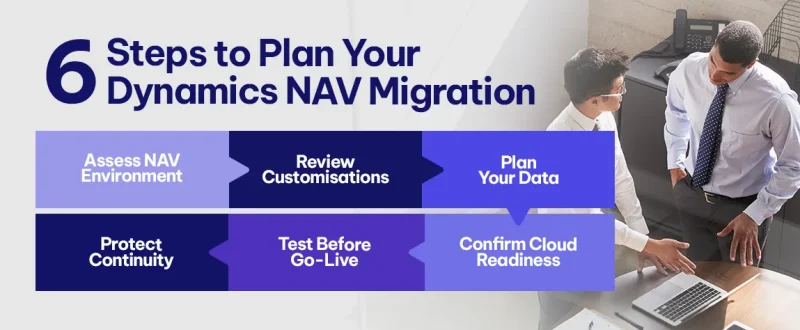
1. Assess Your Current NAV Environment
Before choosing a migration path, establish what you have today.
- Document your NAV version, database configuration, company structure, user roles, reporting requirements, integrations and third-party applications. Identify business-critical processes across finance, purchasing, inventory, warehousing, sales and reporting.
Also determine which features are standard NAV functionality and which depend on custom development.
- This distinction matters because older environments often contain undocumented modifications that have become essential to daily operations. A migration assessment should identify these dependencies before the project scope or budget is finalised.
Review your Microsoft product lifecycle dates as part of this assessment. The urgency and available options may differ depending on your version and support status.
2. Review Customisations and Extension Compatibility
Customisation is often one of the most significant factors affecting NAV migration complexity.
Older NAV implementations may contain changes written in C/AL, the legacy development language used by earlier versions. Business Central uses the AL language and an extension-based development model for supported custom functionality.
Review each customisation and classify it as:
- Retain: Required for a genuine business or regulatory need.
- Replace: Available through standard Business Central functionality or a supported extension.
- Redesign: Necessary, but better implemented using a revised process.
- Retire: No longer delivers sufficient business value.
3. Plan Data Migration and Historical Records
ERP data migration requires more than copying database tables. Data must be consistent, accurate and suitable for the target system.
- Start by reviewing customers, suppliers, inventory items, chart of accounts, open transactions, dimensions and other master data. Identify duplicate records, incomplete fields and inconsistent codes.
- Then decide which historical information must be available in the new environment. Finance teams may need detailed transaction history for reporting and audit purposes, while other businesses may retain older records in a separate read-only archive.
The migration plan should define what will be transferred, how balances will be reconciled and how historical information will remain accessible.
4. Confirm Cloud Readiness and Security
Business Central Online offers a cloud-managed ERP environment, but moving to the cloud requires a review of integrations, access controls and operational dependencies.
- Confirm that connected applications, reporting tools, payment systems, warehouse solutions and external services can work with the target environment. Where direct database integrations exist, investigate supported alternatives such as APIs or extensions.
- Review identity management, user permissions, multifactor authentication, segregation of duties and audit requirements. Apply least privilege so users have access to the functions and information required for their roles.
Cloud readiness is not just a technical exercise. It also requires agreement on how the ERP will be administered, supported and maintained after migration.
5. Test Business Processes Before Go-Live
Testing should validate complete business processes rather than individual screens.
For example, test the full procure-to-pay cycle, from purchase order creation through goods receipt, invoice processing and payment. For order-to-cash, validate order entry, inventory allocation, shipment, invoicing and financial posting.
Include user acceptance testing with employees who perform these tasks every day. Test integrations, reporting, permissions, exception handling and month-end processes.
Define clear acceptance criteria, document defects and assign owners for resolution. Business users should confirm that the new system supports their operational requirements before the final migration is approved.
6. Protect Business Continuity During Cutover
An ERP migration affects financial operations, inventory, purchasing and customer service. A poorly planned cutover can create delays, incomplete transactions and reconciliation problems.
- Prepare a cutover plan that specifies the migration window, data freeze, final data transfer, validation steps, user access and go-live approval.
- Also define contingency arrangements. Agree on decision-makers, escalation paths and the conditions under which the business would pause or reverse a cutover where technically and contractually feasible.
- After go-live, provide additional support, monitor integrations and reconcile critical transactions. Keep the project team available to resolve issues quickly as employees adjust to the new system.
Your 2027 Dynamics NAV Migration Readiness Checklist
Use this checklist to establish whether your organisation is ready to begin planning:
- Confirm your NAV version and applicable Microsoft support dates.
- Complete an ERP assessment covering processes, integrations and technical dependencies.
- Decide whether upgrading existing functionality or reimplementation is more suitable.
- Inventory C/AL customisations and assess AL extension requirements.
- Confirm compatibility of third-party extensions and integrations.
- Clean master data and define historical data retention requirements.
- Validate cloud readiness, security controls and access permissions.
- Complete trial migrations, reconciliation and user acceptance testing.
- Approve cutover, contingency and post-migration support plans.
Completing these steps helps establish a realistic scope, budget and timeline before the project moves into implementation.
Why Choose Exigo Tech as Your Managed Intelligence Partner
Moving from NAV to Business Central requires coordination across ERP processes, data, integrations, security and change management. We help organisations plan their transition around business requirements rather than simply transferring existing technology.
- Business Central Migration Assessment: Evaluate your current NAV environment, migration options, dependencies and project risks.
- ERP Consulting and Implementation: Align Business Central configuration with finance, inventory, purchasing and operational workflows.
- Data and Integration Services: Plan data migration, reconciliation and connectivity with relevant business systems.
- Managed Application Support: Support ongoing optimisation, troubleshooting and improvements after go-live.
As your Managed Intelligence Partner, we help connect ERP modernisation with operational efficiency, better visibility and sustainable business growth.




 Exigo Tech - Ask AI (Beta)